Payroll templates let you download the payroll file in a custom format so you can, for example:
Pick certain columns to show,
Change column names,
Combine several column values into one column.
This lets you, for instance, match bank requirements and make a template that fits them.
Here, you can learn how to create templates for payrolls and download then in Excel format.
From the sidebar click on Payrolls > Payroll Templates. You'll see the Payroll Templates page.
Click on Create Template. You'll payroll template info page and it's got a bunch of data fields (click the button below to know more about them).
Template Columns
Each payroll statement has some default columns with the following names (and a description for each):
# | Column Name | Column Description |
1 | Employee Name | Non-numeric value |
2 | National ID/Iqama | Non-numeric value |
3 | Bank Code | Non-numeric value |
4 | IBAN | Non-numeric value |
5 | Basic Salary | A numeric value telling you how much the basic salary is |
6 | Housing Allowance | A numeric value telling you how much the housing allowance is |
7 | Other Allowances | A numeric value telling you the total of any other allowances |
8 | Overtime | A numeric value telling you the total pay for overtime |
9 | Offences Penalty | A numeric value for the sum of offences deductions (like late, early leaving, absence) |
10 | Unpaid Leave | A numeric value for the deduction because of unpaid leave |
11 | Social Insurance | A numeric value for the deduction made for social insurance |
12 | Loan Installment | A numeric value for the deduction set for loan installment |
13 | Other Deductions | A numeric value telling you about any other deductions |
14 | Net Salary | A numeric value for the salary after adding allowances and deducting penalties |
15 | Note | Non-numeric value that describes the note entered by the person who generated the payroll |
Payroll template is just a set of columns. Each column has to have a name and at least one value from the list of payroll columns above. If you pick more than one value for a column, numbers will be added up, and non-numeric values will just get joined like plain text.
Example: Let's say you want to download a payroll file in a template that only has two columns: one called Employee Info (holds name and Iqama number), and another called Net Salary (column 14). So, the best way is to make a template like in the picture below.
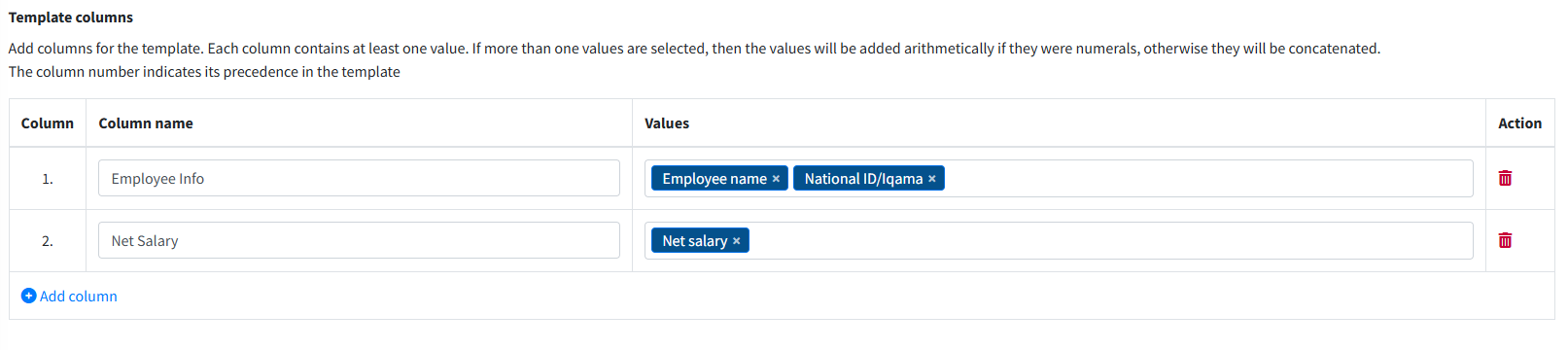
The table below is an example of what you'd get from this template:
Employee Info | Net Salary |
Osama Ali1234567890 | 8541.67 |
Fill in the info and then hit the save button.
From the sidebar, click on Payrolls> View payrolls. The Payrolls page will show up.
Next to the payroll you want to view, under the Action column, click on View.
Click the download button to get the payroll in its default template or pick a template from the available ones.
