
Why do you need to deactivate an employee's account?
To delete an employee account:
Before you can delete an employee account, you have to deactivate their account first. Deactivating it will prevent them from using the Mawqoot app and the web platform, and that includes:
They won't be able to sign in.
They can't check-in anymore.
They won't show up in reports like attendance or payroll.
Freeing up a seat:
Deactivating an employee's account will free up one seat, so you can use it to add or reactivate another employee.
Deactivate an employee account
From the sidebar, click Comany> Employees.
Next to the name of the employee you want to deactivate, under the Action column, click Deactivate Account.

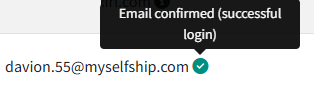
Only accounts for employees who've confirmed sign-up by logging in from the email sent to them after creating the account can be deactivated. The image below shows an example of a confirmed account:
A confirmation page for deactivating the account will appear, click the confirm button.

An email will be sent to the employee about their account status on Mawqoot.
You can reactivate the account any time later.