
Delete an Employee Account
From the sidebar, click on Company> Employees.
Next to the name of the employee you want to delete the account for, under the Action column, click Delete Account.
A confirmation page will show up, click the confirm button.

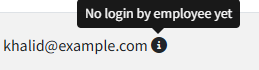
Only deactivated accounts and employee accounts that have never logged in can be deleted. The image below shows an example of an employee account that hasn't been accessed yet:

A deletion notification will be sent to the employee's email.

All employee data will be permanently deleted, including attendance records, offences, leaves... and more, and you won't be able to recover it.